Managed automation for small business

Your office on autopilot. Your team giving input where it matters.

Stigg builds your custom workflow automation, runs it on infrastructure dedicated to you, and brings the judgment calls to your team for input.

  • Runs on the tools you already use
  • Nothing goes out unwatched
  • Live in weeks, not months or years
Office · today Stigg Engine
  1. Invoice #1041 · Acme Fabrication$1,850 · drafted from the job sheet QueuedReview
  2. Delgado Motors · 12 days overdueSecond reminder, tone set by you QueuedReview
  3. Vendor bill · Turner SupplyLine items checked against PO 2213 QueuedReview
  4. Invoice #1042 · Ironclad Fabrication$4,550 is over your $3,000 review threshold QueuedReview
  5. Vendor bill · Okafor & SonsInvalid email address - Stigg notified. QueuedReview
  6. New appointment · Whitfield RealtyBooking confirmed, payment link sent QueuedReview
Handled automatically Waiting for a person Error - Stigg notified

What you get

A running automation, and a clear place for the decisions it shouldn't make alone.
Stigg Engine
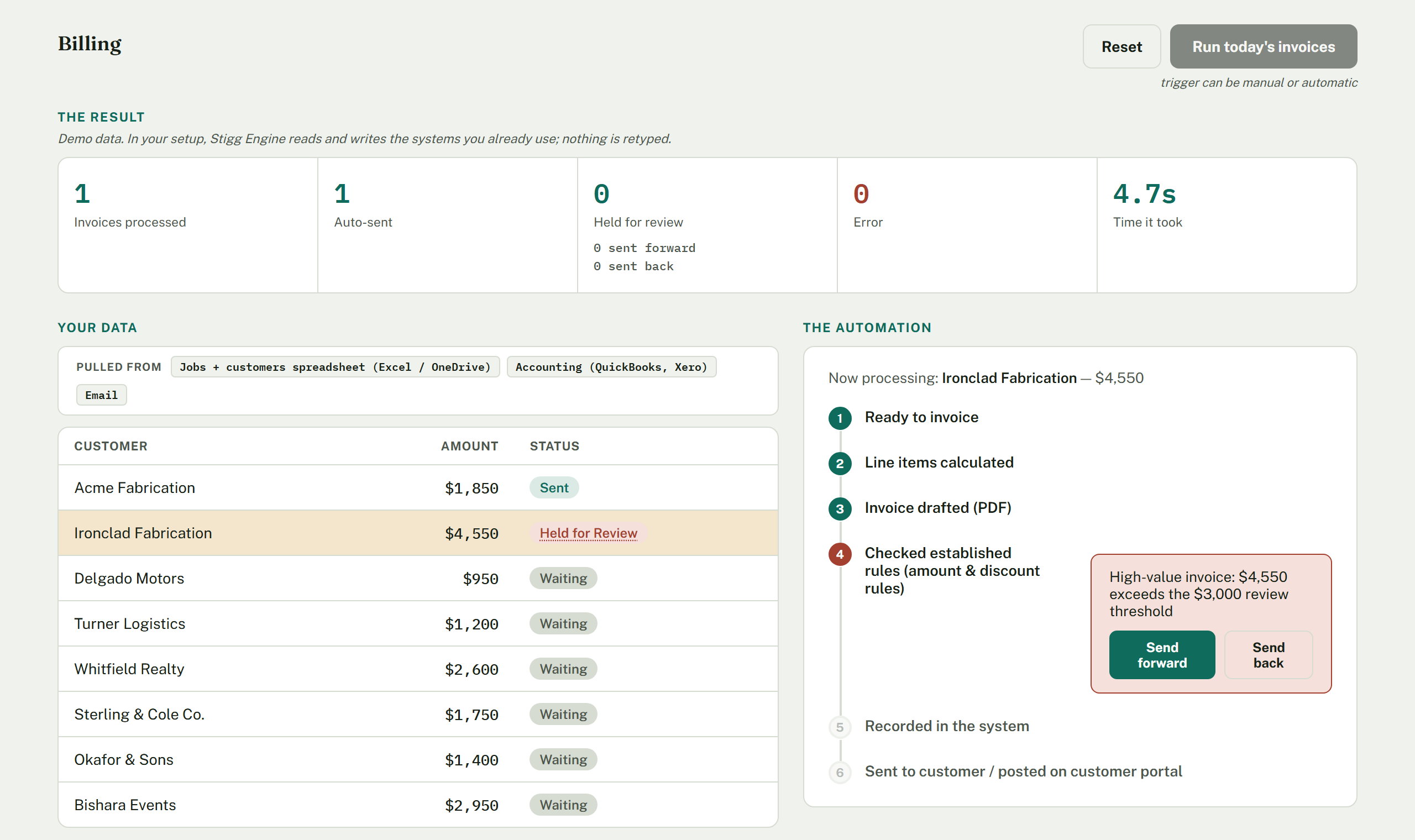
The Stigg billing automation mid-run: invoices processed down a customer list, one held for review because it exceeds the $3,000 threshold, with Send forward and Send back buttons for a person to decide.
The Billing snapshot above is just one of many possible examples. The same engine can run an unlimited number of custom workflows, such as collections, vendor payments with PO matching, appointment scheduling, prescriptions and refills, customer communication, and employee onboarding. It's built to help automate whatever your office needs. Demo data shown here, but your setup reads and writes to the systems you already use.
  1. 1

    The routine work clears itself

    Invoices drafted, reminders sent, bills matched to purchase orders, records updated. Nothing retyped between systems.

  2. 2

    Judgment calls wait for a person

    Anything outside the rules you set, like a high-value invoice or a disputed line, pauses and asks your team for input — a decision, a correction, or a missing detail.

  3. 3

    Failures are visible, not silent

    A technical error shows up as exactly that, kept separate from business decisions, so nothing quietly falls through.

How it starts

Four steps, and the first one is just a conversation.

  1. 01

    Intro call

    Thirty minutes, free. You tell us where the friction is. We tell you whether it's worth automating and whether we're the right fit.

  2. 02

    Discovery & roadmap session

    Two hours, $500. We map how the work really moves through your business, then send you a written roadmap within five business days — what to automate, in what order, and what it should cost.

  3. 03

    A firm price, in writing

    The roadmap becomes a Service Order with your setup fee, monthly price, and included runs fixed. Month to month, no minimum term. Nothing starts until you sign.

  4. 04

    Live in weeks

    Your team gives input from day one. We watch the first runs with you and tune as you go.

Get Started

Let's blueprint your business.

Tell us where the friction is. We'll show you what the blueprint reveals.